Showing posts with label Ubuntu. Show all posts

Friday, August 5, 2011

Installing Smaba in Ubuntu 11.04


Samba is a implementation of SMB/CIFS networking protocol for Unix systems.It provides support for cross platform file and printer sharing that means you can share your files across computers (which may have different OS). Samba can also function as an NT4-style domain controller, and can integrate with both NT4 domains and Active Directory realms as a member server.Samba can be run on nearly all Linux distributions and many other OS like Windows,Mac etc.

Features

Wednesday, July 6, 2011

Ubuntu 11.10 Release Schedule Changed, Alpha 2 Delayed

Ubuntu 11.10 Daily BuildThe release schedule for the upcoming Ubuntu 11.10 (Oneiric Ocelot) operating system has been modified last week by Canonical. The second Alpha version was supposed to arrive for testing last Thursday, June 30th, but it was rescheduled for July 7th.


For Ubuntu 11.10 (Oneiric Ocelot), Canonical decided to change the release schedule again, rescheduling Alpha 2 for July 7th. The rest of the dates remain the same. Here is the new release schedule for Ubuntu 11.10:

July 7th, 2011 - Alpha 2 release
August 4th, 2011 - Alpha 3 release
September 1st, 2011 - Beta 1 release
September 22nd, 2011 - Beta 2 release

Tuesday, July 5, 2011

Save Battery Drain with Bumblebee


Any laptop would definitely lose its charm if it requires frequent visits to the charging points and this is a fact that most Laptop owners hate in their laptops. Today this scenario is getting more complicated. As laptops are getting faster and as their graphics support increases the charge consumption also increases.
Ubuntu Laptop Battery.jpg

Monday, June 27, 2011

No Synaptic Package Manager in Ubuntu 11.10


When Canonical started developing the Ubuntu Software Center, I knew that a time will come when it will completely replace Synaptic. The Software Center is a noob-friendly replacement for Synaptic where users can discover new applications more easily.
The Software Center had already taken over the function of Gdebi in Ubuntu 10.10 “Maverick Meerkat” and Gdebi is no longer included in the Ubuntu ISO. Unexpectedly, Canonical has decided that it is time for the Software Center to replace Synaptic as well. So, in the next daily build of Ubuntu 11.10, Synaptic will no longer be installed by default.

Sunday, June 26, 2011

31 Useful Ubuntu 11.04 Unity Keyboard/Mouse Shortcuts


Ubuntu 11.04 'Natty Narwhal' will be released in another 8 days or so. We have followed the development of Ubuntu 11.04 very closely. In fact, we have reviewed all the previous developmental releases of Ubuntu 11.04 Natty Narwhal so far including Alpha 1, Alpha 2,Alpha 3 and Beta 1 releases. In my opinion, the overall Ubuntu 11.04 experience is so much better and involving if you know some essential Ubuntu Unity keyboard and Mouse shortcuts. So here are a bunch of very basic yet useful Ubuntu 11.04(Unity) keyboard shortcuts. 

Ubuntu 11.04 Unity Shortcuts

Ubuntu Unity Shortcuts

Top 10 Ubuntu 11.04 Unity Panel Applets

Review image
The following article will list some of the most important panel applets, also called indicators, for Ubuntu 11.04's Unity interface.

The Ubuntu 11.04 (Natty Narwhal) operating system introduced a different user interface, designed by Canonical, called Unity. The default indicators are nice, but many people complained that they miss their usual applets on the panel.

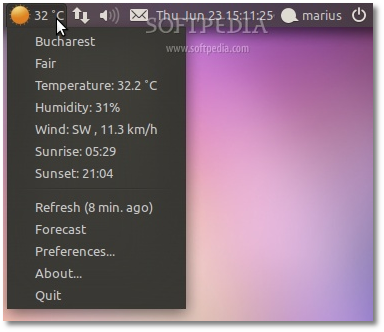
CPU monitors, system load indicators, bandwidth statistics, weather indicators, RSS news feeds, DropBox handlers, and many more other applets can be quite easily installed on Ubuntu 11.04.

This article will show a list of ten most used Unity indicators (panel applets), with installation instructions and screenshots. At the end of the article we will also list other indicators, less important, and where to find them.

1. Weather Indicator

Saturday, June 25, 2011

Unity Grab Handles Are Beautiful, Learn How to Enable it in Ubuntu 11.04 Natty Narwhal


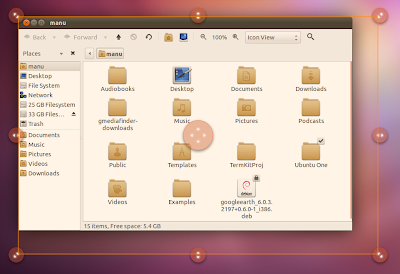
Unity Grab Handles are a fun and aesthetically beautiful way to resize windows in new Ubuntu Unity. Even though they are not enabled by default in Ubuntu 11.04 Natty Narwhal, you can easily turn Unity Grab Handles on by following a few easy steps.

Enable Unity Grab Handles in Ubuntu 11.04

How to Enable Unity Grab Handles in Ubuntu 11.04?

Wednesday, June 22, 2011

Installing Nginx With PHP5 (And PHP-FPM) And MySQL Support On Ubuntu 11.04


Nginx (pronounced "engine x") is a free, open-source, high-performance HTTP server. Nginx is known for its stability, rich feature set, simple configuration, and low resource consumption. This tutorial shows how you can install Nginx on an Ubuntu 11.04 server with PHP5 support (through PHP-FPM) and MySQL support.

Tuesday, June 21, 2011

First glimpse of Ubuntu Software Centre 5.0!


One thing in Ubuntu, which has always hit rock bottom in terms of popularity, is Ubuntu Software Centre. The reason often cited is its weak design and layout. Lot of attempts were made, but none of them brought a wind of change in perception among the user community. The guys at Canonical have been under fire recently to resolve this problem. One more attempt is round the corner, Ubuntu Software Centre 5.0 is expected to launch soon.
usc-2.jpg
It seems the design teams at Canonical are now working at full stretch in trying to design, test and evaluate a possible layout for the Ubuntu Software Centre in the next and soon to be launched version christened the Ubuntu Software Centre 5.0.

Saturday, June 18, 2011

Powertop 2.0 – saving power under Linux


Powertop, a tool for detecting power wasters under Linux, is about to make a generational jump: version 2.0 provides improved diagnostic options and a redesigned user interface. It also offers a simple, manual way of enabling numerous power-saving features that can noticeably extend the battery life of notebooks.
Currently available as beta version 1.98, Powertop 2.0 is nearing completion. The second generation Linux program for tracking down power wasters has been largely rewritten. Developer Arjan van de Ven explains the reasons for the rewrite in his release email for the first beta, which was released at the beginning of the year: the codebase for the first generation of Powertop had grown rather out of hand after many new features were added.

10 best Linux distros for 2011 -1


10-best-linux-distros-for-2011These three attributes are unique to each Linux distribution. But at the same time, each Linux distribution is at liberty to take and mix whatever it wants from any other.This creates a rather unique situation, where good ideas quickly spread, and bad ones fail. And as a result, there are dozens of distribution updates each month, hundreds each year, in a race to leap-frog each other in the race to the top of the DistroWatch.com charts.
This is why the answer to the question of which distribution is best for you changes with the tides, and why we're keen to keep on top of distribution developments.

Friday, June 17, 2011

How to install Firefox 5 on Linux Mint, Ubuntu, Debian, Fedora, Opensuse,


. or any other Linux distribution.

This howto explains how to install Firefox 5 RC on Linux distros, without replacing your current Firefox installation.
Firefox 5 Release Candidate has been released on June 16, 2011.
The final release date is set to June 21.
More information on Firefox release dates, beta, aurora and nightlies on the official releases wiki.

4 Tricks with sudo


I think that sudo is become a wide used command with Ubuntu, where you don’t even have a root password, before that probably it was used only in some data-centers to restrict access to some commands.
sudo allows a permitted user to execute a command as the superuser or another user, as specified in the sudoers file.
In this article I will show some uses a little less common for this command, for a general description of the command you could read the page about sudo on wikipedia


1)

sudo !!
you wanted to give a command as root but you forgot to use sudo ? Don’t worry with this command you’ll use the history combined with sudo, the argument !! has the same meaning that !-1 , so this command runs your last command as root.
Obviously this could be used also as

Tuesday, June 14, 2011

Top 6 Eyecandy Compiz Animations and Effects that Comes with Compiz Experimental Plugins


Who doesn't like some eyecandy for their desktops, definitely not me. Compiz has enthralled Ubuntu users for years now. When GNOME officially ditched Compiz for Mutter for its next version, Ubuntu decided to stick with Compiz for its Unity Shell. Compiz is actively being developed now and we can expect a lot of surprises for next major Ubuntu release, Ubuntu 11.04 "Natty Narwhal". Here is a collection of Compiz experimental plugins that does not come with the default package and which is definitely going to blow you away.

compiz experimental plugins

5 Useful Compiz Tweaks for Ubuntu 11.04 Natty Narwhal


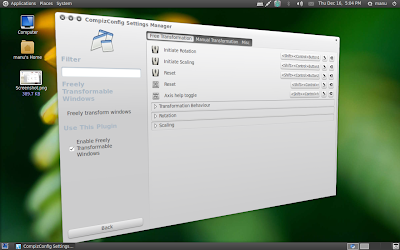
I have been a Compiz fan ever since I started using Linux. Compiz is also a very integral part of Ubuntu, more so with the introduction of new Unity desktop for Ubuntu 11.04 Natty Narwhal. There are many Compiz effects that are not enabled by default and some of them are really good IMO. Useful Compiz tweaks for Ubuntu 11.04. Note: Post not meant for advanced users.

Compiz Tweaks for Ubuntu 11.04 Natty Narwhal

Chrome nearly replaced Firefox in Ubuntu Linux, Mark Shuttleworth says part 4


Resume............
Page 4 of 4
"Very simplistic characterizations of any large group are almost certainly going to turn out to be false," he said. "The company has been caught abusing a monopoly position. I think that's terrible. They're not the first to do it. They're not the last to do it, either. The question really is, can one engage and work with them and compete with them on an evenhanded basis?"

Chrome nearly replaced Firefox in Ubuntu Linux, Mark Shuttleworth says part 3


Page 3 of 4
"Everybody has the things they want to work on," Shuttleworth said. "I think it's a little tasteless for folks who work for competitors to jump up and down and say that Canonical doesn't contribute. I find that bizarre."

Why Mark Shuttleworth doesn't own a smartphone

Shuttleworth spent $20 million to become a space tourist in 2002, but hasn't ponied up $200 for a smartphone.
"I'm the last of the non-smartphone holdouts," Shuttleworth said. "Someone described my phone as being designed not to get stolen."

Chrome nearly replaced Firefox in Ubuntu Linux, Mark Shuttleworth says part 2


continue.............
"The Linux graphics stack enablement isn't great," Shuttleworth said. "There are a lot of devices where [Unity] is not an appropriate choice. So we've been working on a 2D version of Unity, which preserves all the same semantics and behaviors, but it's visually less intense."

Chrome nearly replaced Firefox in Ubuntu Linux, Mark Shuttleworth says


Canonical CEO Mark Shuttleworth lavishes praise on Google and the Chrome browser part 1

anonical founder Mark Shuttleworth is a big fan of Google Chrome, and says the browser could replace the standard Firefox in future versions ofUbuntu Linux.
Shuttleworth, the onetime space tourist, is spending his days on Earth to guide Canonical through a crossroads.
The overhauled user interface Canonical created for Ubuntu was greeted with a mixed reaction upon its release two months ago. But Canonical may not be done making radical changes to what is likely the world's most popular Linux desktop OS.

Sunday, June 12, 2011

2 Ways to Install the Latest Flash Player in Ubuntu 11.04

In this tutorial I'll explain two different methods of installing the latest version of Flash Player in Ubuntu Natty Narwhal. The first one is the manual way, which means we will have to download the Flash plugin from the Adobe website and copy it manually in the ~/.mozilla directory. The second way is straightforward by using Ubuntu's multiverse repositories. This tutorial applies for the 32-bit version.
Install Adobe Flash Player Manually
First, we will need to download the .tar.gz archive from the official website. The current version is 10.3.181.22. Next, open a terminal, go to where you saved the archive and uncompress it:
tar -xzf install_flash_player_10_linux.tar.gz
After uncompressing it there will be a directory, called usr, and the actual plugin, libflashplayer.so. We'll need only this file. The next step is to create a directory called plugins inside the ~/.mozilla folder, where ~ is your home directory (e.g. /home/username/). To do this type:
mkdir -p ~/.mozilla/plugins
And now let's copy the plugin inside the newly created directory:
cp libflashplayer.so ~/.mozilla
This should do it. Restart Firefox and Flash videos should be working now. This location (~/.mozilla) is a folder where most of the web browsers are looking for the plugin, not just Firefox. So once it's set up in there Konqueror or Epiphany will be able to use it too.
Install Adobe Flash Player from Ubuntu's Repositories
Flash Player is also shipped in Ubuntu's multiverse repositories. To install it using this method, open a terminal and type in the following commands:
sudo apt-get update
sudo apt-get install flashplugin-installer
The difference here is that this method installs it in /usr/lib/flashplugin-installer/libflashplayer.so, while the manual one lets you install as normal user.
Install from the Repositories Using Ubuntu Software Center
This is the graphical way of doing exactly what we did in the previous method so if you did that already there is no need to repeat it. Ubuntu Software Center is a friendly GUI (Graphical User Interface) frontend to APT, the package management system used by Ubuntu.

To start it, go to the Applications menu, then click on the Ubuntu Software Center entry:

usc01